This page describes the Member Directory, one of the main features of the SaaS Management functionality.
Note: This feature requires a contract for the SSO Free + SaaS Management plan or the SSO Pro + SaaS Management plan.
For pricing, see here
What Is the Member Directory Feature?
This feature visualizes the account status and usage of TrustLogin members.
Key Features of the Member Directory
- List and visualization of member information:
In addition to member attribute information and account status, you can check each member's usage status—such as the number of assigned apps and groups—all in one place. - Flexible filtering and customization:
You can narrow down the list by conditions such as integration source, role, status, and authentication method.
Screen Layout
If you are on an eligible plan, the following screen appears on the Admin Page > Members page.
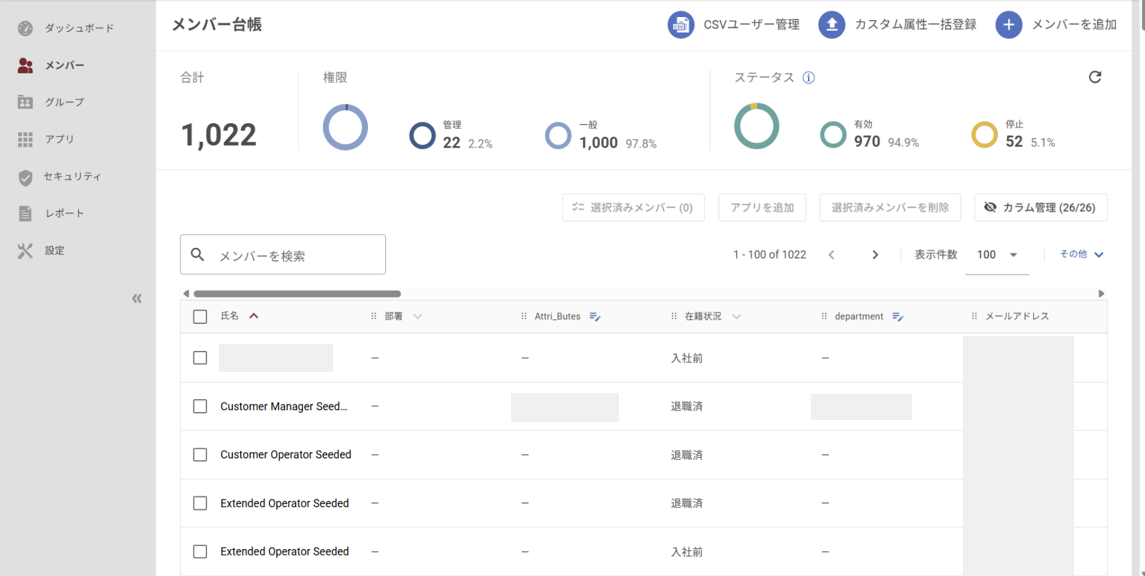
① Member Overview
Displays totals for TrustLogin members by role and status.
② Filter
Click the "Other" menu to expand the filter items.
Specifying conditions lets you narrow down and display matching members.
③ Member Information Fields
You can view member information within TrustLogin in a list format.
The displayed fields can be customized using column management.
Note: Criteria for Determining Employment Status
This is determined based on whether each member's "Hire Date / Termination Date / Leave-of-Absence Date / Return-to-Work Date" has been entered.
- Before Joining: No hire date entered
- Active: Hire date entered
- On Leave: Hire date + leave-of-absence date entered
- Active: Hire date + leave-of-absence date + return-to-work date entered
- Terminated: Hire date + leave-of-absence date + return-to-work date + termination date entered
FAQ
-
What happens if I change to a plan other than the SaaS Management plan?
→ The Member Directory feature will no longer be available, and the screen will revert to the standard Members screen.